article
SSL, TLS, and HTTPS: a beginner’s guide
Understand TLS handshakes, certificates, corporate interception, passkeys, and work profiles—and where encrypted connections end.
HTTPS protects traffic in transit. What an intermediary can read depends on where the encrypted connection ends. This guide explains certificates, interception, and passkeys, starting with the connection itself.
For a practical look at managed work devices, read the companion article: HTTPS, passkeys, and what your employer can see.
SSL, TLS, and HTTPS
SSL is the older protocol. TLS replaced it, although people still say “SSL certificate.” HTTPS is HTTP carried over a TLS-protected connection. TLS protects the contents from eavesdropping and tampering in transit and lets the browser verify the website’s identity.
What happens in a TLS handshake
- The browser and website negotiate connection settings and typically exchange temporary public keys.
- The website presents a certificate. The browser checks the hostname and the chain to a trusted certificate authority. The website proves it holds the matching private key by signing handshake data.
- Both sides derive shared encryption keys from the key exchange. They use those keys to protect HTTP requests and responses.
Where an intermediary can read traffic
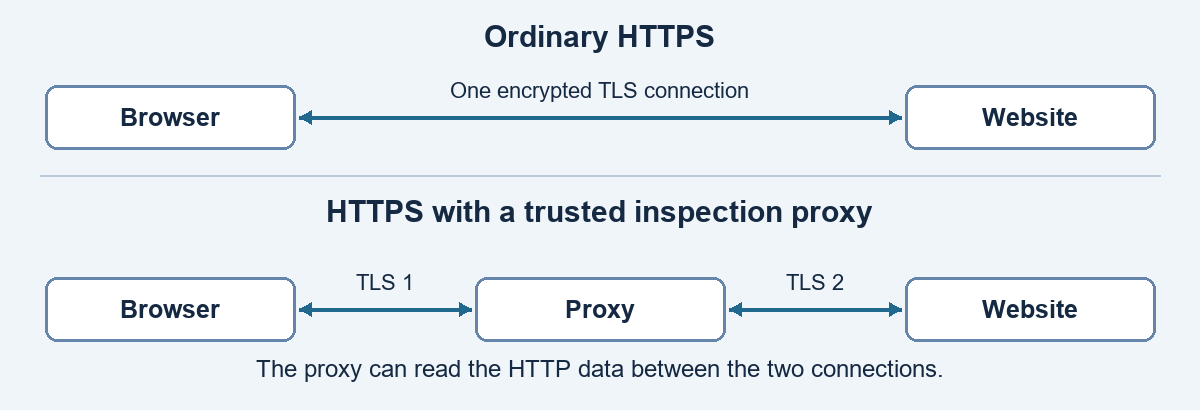
A man-in-the-middle (MITM) sits between the browser and website. Redirecting traffic alone usually fails because the browser still checks the certificate. An impostor can succeed if the browser trusts its certificate for the target domain or if the user bypasses a certificate warning where allowed.
Corporate inspection and personal devices
A corporate inspection proxy can issue website certificates through a company certificate authority the browser trusts. The proxy terminates TLS on each side, reads or checks the HTTP data, and re-encrypts it. Ordinary corporate Wi-Fi can see network metadata such as destination IP and timing. Reading HTTPS contents requires inspection or access at an endpoint.
Passwords, passkeys, and session cookies
On an inspected connection, the proxy can read a submitted password. A passkey instead signs a fresh challenge for the site it was registered with. Its private key stays out of login traffic, and a captured signature cannot authenticate a later sign-in. This makes passkeys resistant to lookalike-site phishing.
After sign-in, a website may issue a session cookie. An inspecting proxy can see it. If the site accepts a valid cookie on its own, someone who copies it may be able to make requests as that user. What a company records depends on how its proxy is configured.
What a work profile changes
On a personally owned Android device, a Work Profile separates work apps and data from the personal side. IT can manage or remove the work profile. A VPN or certificate confined to the profile applies to work apps. A personal browser on a personal network stays outside that setup. Fully managed devices can have broader controls.
Inspection can also affect availability
The Fortinet Community discussion Some Website not loading with Deep Inspection describes users encountering website timeouts and connection resets with inspection enabled. Reports varied by configuration, showing why the inspection layer matters when troubleshooting HTTPS connectivity.
I was involved in dealing with the ramifications of this issue. It provides a practical connection between the TLS concepts above and the operational impact of inspection. The thread is a record of community observations, rather than a universal fix.
Continue reading
HTTPS, passkeys, and what your employer can see applies these concepts to work laptops, inspected connections, session cookies, and personal phones.